GPT-Image-2.6 Image Generation
Generate and edit images asynchronously with Flare and Sunburst, including markup-guided edits, animated GIFs, and SVG output.
Tüm belgeler/v1/images/generationsText-to-image, editing, GIF, and SVG requests all use POST /v1/images/generations. Read data[0].task_id from the submission response, then query the task for file URLs.
İstek örnekleri
curl --request POST \
  --url https://api.apisea.ai/v1/images/generations \
  --header 'Authorization: Bearer <token>' \
  --header 'Content-Type: application/json' \
  --data '{
  "model": "gpt-image-2.6-flare",
  "prompt": "A cozy reading nook by a rainy window, warm lamp light",
  "size": "1:1",
  "resolution": "1k",
  "quality": "medium",
  "n": 1
}'Authentication
AuthorizationstringrequiredUse Bearer Token authentication. Get a key from the API Key page.
Authorization: Bearer YOUR_API_KEYChoosing a model
| Model | Use case |
|---|---|
gpt-image-2.6-flare | Faster generation for rapid iteration; the recommended default. |
gpt-image-2.6-sunburst | Prioritizes detail and editing consistency, particularly for multi-turn edits at medium / high quality. |
Both models have the same token rates and consumption at identical settings. Choose based on speed and detail requirements.
Request parameters
modelstringrequiredModel name: gpt-image-2.6-flare or gpt-image-2.6-sunburst.
nsfw_checkbooleandefault: falseWhether to run content moderation before submitting the image task.
true: useomni-moderation-latestto review prompts and input imagesfalseor omitted: do not send a moderation request, adding no moderation cost or latency (default)
promptstringrequiredGeneration or editing instructions, up to 32,000 characters. Describe the subject, composition, and what to change or preserve.
sizestringdefault: autoStill images and SVG support 15 aspect ratios, exact pixels such as 1600x1200, or auto. Explicit auto lets the upstream model choose; omitting this field for still-image editing selects dimensions from the first input image’s aspect ratio and resolution. GIF sizes follow separate rules below.
resolutionstringdefault: 1k1k / 2k / 4k, in lowercase. Combined with an aspect-ratio size to determine pixels; ignored when exact pixel dimensions are supplied.
qualitystringdefault: autolow / medium / high / xhigh / max / auto. Other values return HTTP 400 at submission. When omitted or set to auto, the model chooses the quality level automatically. The selected level may vary and is not fixed to low; specify a level explicitly if you need a fixed setting.
When omitted or set to auto, funds are reserved at the max quality level and the final charge is settled at the level actually selected.
nintegerdefault: 1Integer from 1 to 4; for GIF, this is the number of animations. SVG requires 1. Explicit 0, negative values, or values above 4 return HTTP 400 instead of falling back to the default.
output_formatstringdefault: pngpng / jpeg / webp / gif / svg. Both GIF and SVG support text prompts and reference images through image_urls. Other values return HTTP 400 at submission.
output_compressionintegerInteger from 0 to 100, for jpeg / webp only. Out-of-range values or use with png / gif / svg return HTTP 400 at submission.
backgroundstringtransparent / opaque / auto. For non-SVG output, omission uses the upstream default; explicit transparent requires png / webp. Text-to-SVG has a transparent background by default. For SVG with reference images, omitted background or auto is treated as opaque. To request transparency, explicitly set background: "transparent".
moderationstringdefault: lowContent moderation level: auto / low. Other values return HTTP 400 at submission.
image_urlsstring[]Up to 16 reference images as public HTTP(S) image URLs or image Data URLs, for still-image editing, GIF, or SVG generation. For local files, use the image upload endpoint first and pass the returned url.
mask_urlstringInpainting mask, requiring image_urls. Use a PNG with an alpha channel matching the first input image’s dimensions; fully transparent regions indicate areas to edit. Accepts an image URL or PNG Data URL. Cannot be combined with markup; unchanged pixels outside the mask are not guaranteed. GIF and SVG do not support masks or markup.
complexitystringPlanning level: low / medium / high, with an upstream default of high, independent of rendering quality. Use low for focused edits and high for dense text, complex layouts, or object relationships; higher planning may be slower or introduce extra changes. No separate fee; supported only by 2.6.
safety_identifierstringOptional stable end-user identifier, up to 128 characters; a hash of a username or email is recommended. APISea does not forward it upstream by default, only when the channel permits it. Omitting it does not affect usage.
Still image and SVG sizes
Exact pixel dimensions must be multiples of 16 on both axes, with each edge at most 3840, a longest-to-shortest edge ratio at most 3:1, and 655,360–8,294,400 total pixels. Resolutions above 2560×1440 are experimental. The mappings below match GPT-Image-2.5; do not apply these still-image limits directly to individual GIF frames.
size | 1k | 2k | 4k |
|---|---|---|---|
1:1 | 1024×1024 | 2048×2048 | 2880×2880 |
3:2 | 1536×1024 | 2048×1360 | 3520×2336 |
2:3 | 1024×1536 | 1360×2048 | 2336×3520 |
4:3 | 1024×768 | 2048×1536 | 3312×2480 |
3:4 | 768×1024 | 1536×2048 | 2480×3312 |
5:4 | 1280×1024 | 2560×2048 | 3216×2576 |
4:5 | 1024×1280 | 2048×2560 | 2576×3216 |
16:9 | 1536×864 | 2048×1152 | 3840×2160 |
9:16 | 864×1536 | 1152×2048 | 2160×3840 |
2:1 | 2048×1024 | 2688×1344 | 3840×1920 |
1:2 | 1024×2048 | 1344×2688 | 1920×3840 |
21:9 | 2016×864 | 2688×1152 | 3840×1648 |
9:21 | 864×2016 | 1152×2688 | 1648×3840 |
3:1 | 1536×512 | 3072×1024 | 3840×1280 |
1:3 | 512×1536 | 1024×3072 | 1280×3840 |
Image editing and masks
This request performs a still-image edit on the first image. Omit mask_url to edit the whole image according to the prompt; omit size to derive output dimensions from the first image’s aspect ratio and resolution. Replace example image URLs with accessible files.
{
  "model": "gpt-image-2.6-sunburst",
  "prompt": "Replace the fully transparent masked area with a gold ribbon. Preserve the product and the rest of the background.",
  "image_urls": [
    "https://example.com/product.png"
  ],
  "mask_url": "https://example.com/product-mask.png",
  "resolution": "2k",
  "quality": "high",
  "complexity": "low"
}Markup-guided editing
Provide markup_url as an HTTPS or Base64 Data URL. The alias markup accepts a string or an {"image_url":"..."} object. file_id is not supported.
- Include
image_urls; markup applies to the first image, with any others used as references. - Use a separate transparent PNG overlay with exactly the same dimensions as the first image. Do not flatten annotations into the original image.
- The first image and overlay must each contain at most 16,777,216 pixels; the overlay file must be at most 50 MB.
- Do not combine with
mask_url. The overlay incurs no image tokens, but the request may still incur additional text tokens.
GIF and SVG do not support masks or markup.
{
  "model": "gpt-image-2.6-flare",
  "prompt": "Recolor the striped vase inside the red circle to solid cobalt blue ceramic. Keep everything else unchanged. Remove the red circle.",
  "image_urls": [
    "https://example.com/kitchen.webp"
  ],
  "markup_url": "https://example.com/vase-circle-overlay.png",
  "quality": "medium"
}Animated GIF output
Set output_format: "gif" to generate an animation from text or provide up to 16 reference images through image_urls, using HTTP(S) URLs or image Data URLs. Do not include mask_url, markup_url, markup, or output_compression.
| Parameter | Default | Description |
|---|---|---|
frame_count | 9 | Integer 2–16. APISea currently caps this at 16, rather than the 64-frame limit in the upstream guide. |
frame_duration_ms | 200 | Duration per frame in integer milliseconds, at least 20, rounded to 10 ms increments. |
size | auto | Pixel dimensions of each frame, both multiples of 16. Omitted or auto currently gives 512×512. Aspect-ratio names such as 1:1 are not supported. |
For GIF, size always specifies each frame’s dimensions and does not follow the reference image’s aspect ratio. Omitted or auto gives 512×512; you can also specify pixel dimensions that meet the rules above.
The upstream model arranges frames on a sheet: 4×2 for 2–8 frames, 3×3 for 9, 4×3 for 10–12, and 4×4 for 13–16. Rows and columns may be swapped to make the sheet closer to square. The whole sheet must have edges at most 3840, at most 8,294,400 pixels, and an aspect ratio at most 3:1; otherwise submission returns 400.
Warning
512x512supports all 2–16 frames;768x768supports at most 12. Even 2 frames at1024x1024exceed the sheet’s edge limit. Billing uses the whole sheet for each animation;n > 1generates and bills multiple animations.
{
  "model": "gpt-image-2.6-sunburst",
  "prompt": "A paper lantern swaying gently in the night breeze, seamless loop",
  "output_format": "gif",
  "frame_count": 9,
  "frame_duration_ms": 200,
  "quality": "low"
}
GIF output is billed using the entire sheet. Reference images incur an additional image input charge under the same rules as ordinary image editing. The reservation estimates 1536 image input tokens per reference image, added to the GIF output reservation. Final billing uses actual usage; 1536 is not a fixed actual token count.
Generate a GIF from a reference image
{
  "model": "gpt-image-2.6-flare",
  "prompt": "The cat in the photo slowly raises its paw and waves, then returns to the starting pose, seamless loop.",
  "image_urls": [
    "https://example.com/cat.png"
  ],
  "output_format": "gif",
  "frame_count": 8,
  "frame_duration_ms": 200,
  "quality": "low"
}SVG output
svgobjectSet output_format: "svg". The image model first generates a reference image, then the text model specified in svg.model authors the SVG.
svg
modelstringrequiredRequired. Choose a model with text token pricing on the platform, such as gpt-5.4-mini or gpt-5.6-sol.
reasoningobject | nullOptional reasoning settings for the SVG author model, independent of complexity, which applies to the intermediate image. Omit or set to null to use the author model default.
reasoning
effortstring | nullThe platform accepts none / minimal / low / medium / high / xhigh / max, case-insensitively. Omit or set to null for the selected author model’s default. Actual supported values depend on that model; see the examples below.
- Supports text prompts and up to 16 reference images in
image_urls.nmust be1andsvg.modelis required. Do not sendmask_url,markup_url,markup, oroutput_compression. qualityandcomplexityapply to the intermediate reference image. Output is a static.svgwithout scripts, external resources, or embedded bitmaps.- Text usage for
svg.modelis charged in addition to image generation. Accounts with fixed per-image pricing do not currently support SVG; submission returns 400. - Text-to-SVG has a transparent background by default. For SVG with reference images, omitted
backgroundorautois treated asopaque. To request transparency, explicitly setbackground: "transparent".
SVG with reference images is billed for intermediate image generation, reference image input, and SVG authoring. Reference input follows ordinary image-editing billing; authoring is settled from data.usage.svg_usage for svg.model. The reservation includes intermediate image output, an estimate of 1536 image input tokens per reference image, and authoring. Final billing is adjusted to actual usage; 1536 is not a fixed actual token count.
Example author model effort support
These examples are not an exhaustive model list. The platform’s seven accepted values are not supported by every model; none of the models below supports minimal.
| Author model | Supported efforts | Unsupported efforts |
|---|---|---|
gpt-5.4-mini | none / low / medium / high / xhigh | minimal / max |
gpt-5.6-sol | none / low / medium / high / xhigh / max | minimal |
gpt-6-luna | none / low / medium / high / xhigh / max | minimal |
gpt-6.1-sol | low / medium / high / xhigh / max | minimal / none |
Omitting svg.reasoning, setting "reasoning": null, or setting "effort": null inside the object uses the author model default. svg.model remains required: do not omit the entire svg object or set it to null. The svg configuration is only valid with output_format: "svg".
If an effort passes platform validation but is unsupported by the author model, the upstream returns a parameter error and the task fails. Check data.error.message and select a supported effort. For other author models, use their actual supported values.
Both text-to-SVG and image-to-SVG send JSON to POST /v1/images/generations, with the nested svg.reasoning.effort field.
SVG author model output comparison
These are image-to-SVG test samples using gpt-image-2.6-flare, quality: "low", and n: 1. For each subject, the references, prompt, and parameters stayed the same; only svg.model changed. svg.reasoning.effort was omitted, so each author model used its own default.
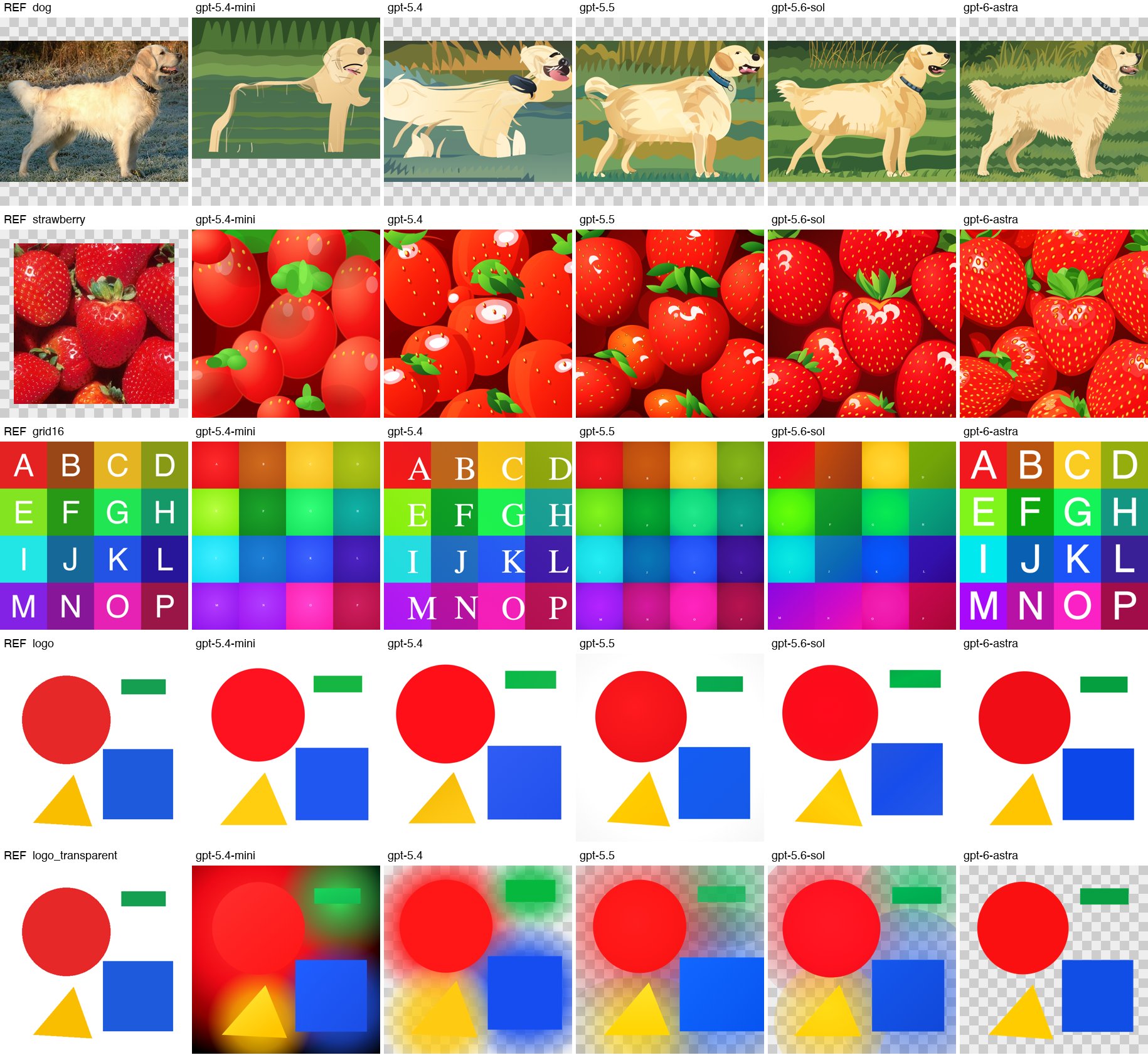
Columns, left to right: reference → gpt-5.4-mini → gpt-5.4 → gpt-5.5 → gpt-5.6-sol → gpt-6-astra. Rows, top to bottom: dog photo, strawberry photo, a 4×4 letter grid from 16 references, simple logo, and logo with background: "transparent".
| Author model | Simple shapes / logos | Photos / realistic content | 16-image letter grid | Transparent logo |
|---|---|---|---|---|
gpt-5.4-mini | Clear shapes | Dog heavily distorted; strawberry detail lost | Letters reduced to tiny dots | Dark background and strong colored halos |
gpt-5.4 | Clear shapes | Dog distorted; strawberries recognizable, with shape and highlight errors | Readable serif letters, partly cropped on the right | Transparent background with colored halos |
gpt-5.5 | Recognizable shapes, slight gray edging | Cartoon-like dog; strawberry seeds and leaves preserved | Letters reduced to tiny dots | Transparent background with faint colored halos |
gpt-5.6-sol | Clear shapes | Pose, composition, and detail retained well | Letters reduced to tiny dots | Transparent background with faint colored halos |
gpt-6-astra | Clear shapes | Closest to the references in these samples, with more complete detail | Colors, order, and letters preserved | Clean transparency without obvious halos |
Based on these samples, start with gpt-5.4-mini for simple shapes or logos; try gpt-5.6-sol or gpt-6-astra for photos and realistic content. For demanding transparency or multi-image layouts, try gpt-6-astra first.
Each cell shows one generation. Repeated runs with the same model may differ. These examples illustrate output quality, not a fixed ranking or a guarantee for every input; the final appearance of background: "transparent" also depends on the author model.
Effort, latency, and cost
Higher effort typically increases reasoning tokens, authoring cost, and latency. Read actual reasoning usage from data.usage.svg_usage.reasoning_tokens; it is already included in output_tokens and must not be added again. For icons or logos, start by omitting effort or selecting a supported low / medium setting.
The platform waits up to 22 minutes for an SVG task. A timeout fails and refunds the task without automatic retries. Keep polling the existing task_id while waiting. The upstream may still be generating after timeout; resubmitting creates a new billable request.
Text-to-SVG
{
  "model": "gpt-image-2.6-flare",
  "prompt": "A minimalist bakery logo with a wheat stalk, flat colors",
  "output_format": "svg",
  "svg": {
    "model": "gpt-5.4-mini",
    "reasoning": {
      "effort": "high"
    }
  },
  "size": "1:1",
  "quality": "low",
  "n": 1
}Generate SVG from reference images
Replace the sample image URL with an accessible file. This request omits background, so it uses an opaque background.
{
  "model": "gpt-image-2.6-flare",
  "prompt": "Convert this image into a clean, faithful flat vector SVG. Keep the same shapes, colors and layout.",
  "image_urls": [
    "https://example.com/logo.png"
  ],
  "output_format": "svg",
  "svg": {
    "model": "gpt-5.4-mini",
    "reasoning": {
      "effort": "low"
    }
  },
  "size": "1:1",
  "quality": "low",
  "n": 1
}Querying task results
Use the task status endpoint, polling every 2–5 seconds until completed or failed. Do not resubmit generation requests while waiting.
curl --request GET \
  --url https://api.apisea.ai/v1/tasks/task_01KXXXXXXXXXXXXXXX \
  --header 'Authorization: Bearer <token>'
On completion, read file URLs from data.result.images[].url[] and download them promptly. Only key response fields are shown below; on failed, inspect data.error.message. Use POST /v1/tasks/batch to query multiple tasks.
{
  "code": 200,
  "data": {
    "id": "task_01KXXXXXXXXXXXXXXX",
    "status": "completed",
    "progress": 100,
    "result": {
      "images": [
        {
          "url": [
            "https://cdn.example.com/f/image/example.png"
          ]
        }
      ]
    }
  }
}SVG usage and response example
In task query responses, data.usage.svg_usage reports usage for the text model that authors the SVG. Other token fields in data.usage report usage for the image model that generates the reference image. Account for each part using its corresponding model’s billing rules. With reference images, reference input usage also belongs to the image model. Do not count it again as authoring usage in svg_usage.
| Field | Type | Description |
|---|---|---|
model | string | Text model actually used to author the SVG. |
input_tokens | integer | Input tokens used by the text model. |
output_tokens | integer | Output tokens used by the text model, including reasoning tokens. |
reasoning_tokens | integer | The reasoning portion of output tokens; do not add it to output_tokens again. |
The following shows key fields of an SVG task response. Token values illustrate field relationships and are not fixed consumption estimates.
{
  "code": 200,
  "data": {
    "id": "task_01KXXXXXXXXXXXXXXX",
    "status": "completed",
    "progress": 100,
    "result": {
      "images": [
        {
          "url": [
            "https://cdn.example.com/f/image/example.svg"
          ]
        }
      ]
    },
    "usage": {
      "input_tokens": 40,
      "output_tokens": 1800,
      "total_tokens": 1840,
      "svg_usage": {
        "model": "gpt-5.4-mini",
        "input_tokens": 1200,
        "output_tokens": 800,
        "reasoning_tokens": 200
      }
    }
  }
}Common parameter errors
The following parameter validation errors return HTTP 400 synchronously at submission. No task is created and no charge is made. Correct the parameters before submitting again.
| Error | Resolution |
|---|---|
quality "ultra" is not supported by gpt-image-2.6-flare | Use low / medium / high / xhigh / max / auto; other values such as ultra are not supported. |
`n` must be an integer from 1 to 4 | Set n to an integer from 1 to 4; 0, negative values, and values above 4 are invalid. |
output_compression must be an integer from 0 to 100 | Set output_compression to an integer from 0 to 100. |
output_compression is only supported with output_format jpeg or webp | Use compression only with JPEG / WebP; remove the parameter for PNG / GIF / SVG. |
moderation "xxx" is not supported | Set moderation to low or auto. |
markup requires image_urls | Include image_urls and ensure the overlay matches the first image. |
markup cannot be combined with mask | Choose either markup or a mask. |
output_format=gif does not support mask_url: GIF output does not support masks | GIF does not support masks. Remove mask_url; you may keep image_urls. |
markup is not supported with output_format=gif | GIF does not support markup. Remove markup and markup_url; reference images may remain. |
frame_count must be an integer from 2 to 16 | Set frame_count to an integer from 2 to 16. |
no supported sheet fits N GIF frames at size WxH | Reduce frame dimensions or frame count; do not use aspect-ratio names. |
output_format=svg does not support mask_url | SVG does not support masks. Remove mask_url; you can keep image_urls. |
markup is not supported with output_format=svg | SVG does not support markup. Remove markup and markup_url; you can keep reference images. |
output_format=svg requires svg.model | Include a svg object with a supported text model. |
svg.reasoning.effort "ultra" is not supported | Use an effort accepted by the platform and supported by the author model; ultra is invalid. |
svg.reasoning must be an object like {"effort": "low"} | Use an object such as {"effort":"low"}, null, or omit reasoning. |
svg.reasoning.effort must be a string | Use a string or null for effort, not a number, boolean, or other type. |
output_format=svg requires n=1 | Set n: 1 for SVG. |
background=transparent requires an alpha-capable output_format | Use PNG / WebP for transparent raster images. SVG with reference images accepts explicit transparent; text-to-SVG can omit the field for its default transparent background. |
Unsupported parameters and billing
Do not send stream, partial_images, input_fidelity, prompt_rewriter, or response_format. This endpoint returns asynchronous tasks and CDN file URLs, not streamed partial images or Base64 image responses. frame_count / frame_duration_ms are GIF-only; the svg configuration is SVG-only.
Flare and Sunburst use the same pricing. GPT-Image-2.6 consumes more tokens at low / medium than 2.5, so do not reuse older cost estimates unchanged. Current rates are available on the APISea pricing page or through /api/pricing; this page lists no fixed prices.
See the OpenAI image generation guide for upstream feature descriptions. For APISea requests, use the endpoints, asynchronous responses, and limits documented here.
FAQ
Can GIF output use reference images?
Flare and Sunburst GIF requests accept up to 16 image_urls. Submit to POST /v1/images/generations and query GET /v1/tasks/{task_id} as usual. Reference images incur an additional image input charge. Masks, markup, and output compression are not supported for GIF.
Does a GIF follow the reference image dimensions?
For GIF, size always specifies each frame’s dimensions and does not follow the reference image’s aspect ratio. Omitted or auto gives 512×512; you can also specify pixel dimensions that meet the rules above.
Can SVG use reference images?
Flare and Sunburst accept up to 16 reference images in image_urls for SVG. Use POST /v1/images/generations, then query the task for the .svg file URL. svg.model is required and n=1; masks, markup, and output compression are unsupported. SVG on gpt-image-2.6-ext remains text-to-image only.
What is the default SVG background?
Text-to-SVG has a transparent background by default. For SVG with reference images, omitted background or auto is treated as opaque. To request transparency, explicitly set background: "transparent".
Yanıtlar
{
  "code": 200,
  "data": [
    {
      "status": "submitted",
      "task_id": "task_01KXXXXXXXXXXXXXXX"
    }
  ]
}
Bu uç noktayı kullanan modeller
Bu belgelerde bir sorun mu buldunuz? support@apisea.ai adresine e-posta gönderin.